

table of contents
Good site architecture SEO is all about how you organize and structure your website. Think of it as the blueprint that guides both your visitors and search engine crawlers. It’s the non-negotiable foundation for everything else you do with your marketing, and a logical structure is what makes your most important content easy to find.

What Is Site Architecture and Why Does It Matter
Imagine you’re building a house. A great blueprint makes sure every room is easy to get to, logically connected, and has a clear purpose. A bad blueprint? That gives you confusing hallways, dead ends, and a frustrating time for anyone inside. It’s a mess.
Your website’s architecture is that exact blueprint. It’s the map Google uses to discover and make sense of your content. When your site architecture is solid, that whole process becomes smooth and efficient.
The Impact on User Experience
One of the biggest goals of your website is to help people find what they’re looking for with zero frustration. When your site structure just makes sense, users can navigate from a broad topic to a specific answer without hitting a wall. That positive user experience (UX) is a massive ranking signal for search engines.
A logical layout keeps people on your site longer, which lowers your bounce rate and encourages them to click around and explore. Google sees all of this behavior as a sign that your website is high-quality and valuable. On the flip side, if users get frustrated and leave, it tells Google your site isn’t the right answer for their search.
How Structure Influences Search Engines
Beyond how people feel using your site, the architecture is critical to how search engines work. Google doesn’t just see a random collection of pages; it sees a whole network connected by internal links. The way you build that network tells Google a few very important things:
- Content Hierarchy: It shows which pages are your heavy hitters. Pages that are fewer clicks away from your homepage are generally seen as more important and authoritative.
- Topical Relevance: When you group related content together, you start building a reputation as an expert on that subject. This is how you build topical authority, which is huge for SEO.
- Crawl Efficiency: A clean, organized structure helps search engine bots crawl your site much more effectively. This makes sure all your best content gets indexed and actually has a chance to rank.
A core part of building a great SEO foundation is understanding what information architecture is, because it’s the science of organizing and labeling your content to make it easy to find and use.
Ultimately, a disorganized site is like a library with no catalog system. All the books might be there, but finding the one you need is next to impossible. Building a solid architecture is the first, most crucial step toward a site that ranks well.
If you’re thinking about making major changes, our comprehensive website redesign checklist can walk you through it without wrecking the SEO you’ve already built.
The Pillars of High-Performing Site Architecture
A killer site architecture SEO strategy really comes down to three things: making it easy for search engines to crawl, giving visitors a great experience, and proving you’re an expert in your field. When you get these three working together, you build a solid foundation for higher rankings, better engagement, and growth that actually lasts.
Each pillar is designed for a different audience—one for the bots, one for the people—but they’re completely connected.
Making Your Site Easy to Crawl
Before any of your content can even think about ranking, search engines like Google have to find it. This is called crawling, and it’s done by bots that follow links from page to page, discovering everything on your website. Your site architecture is literally the map these bots use to get around.
If your site is a disorganized mess, you’re making those bots work way too hard. This eats up your crawl budget—the limited time and resources Google will spend on your site. When your most important pages are buried six clicks deep, the bots might just give up before they ever find them.
The goal here is a shallow, logical structure. Any page should be just a few clicks away from the homepage. A lot of SEOs live by the “three-click rule,” meaning users and bots should be able to land on any page in three clicks or less. It’s a simple concept that makes crawling efficient and tells search engines which pages you value most.
Designing for a Seamless User Experience
While crawlability is all about the search engines, this next pillar is for your actual visitors. User experience (UX) is a huge piece of the modern SEO puzzle, and your site’s structure is central to getting it right. Simple navigation and clean, descriptive URLs let people find what they need without getting frustrated.
When visitors can move through your site without thinking, they stick around longer, check out more pages, and are far more likely to convert. Google sees these positive signals—like low bounce rates and high time-on-page—and understands that your site is delivering real value.
A well-structured website feels like a well-organized department store. Clear signs (your navigation), logical aisles (your categories), and helpful product labels (your URLs) guide people straight to what they’re looking for. The whole experience feels easy and effective.
A strong site architecture acts as a multiplier for all other SEO activities. A confusing structure can undermine even the best content, while a logical one makes everything more effective.
The impact of getting this right can be massive. One e-commerce site overhauled its architecture with smarter internal linking and clearer URL hierarchies, and the results were incredible: a 175% increase in organic traffic and conversions. You can discover more about this case study on Market My Market. That’s proof of just how foundational a good structure really is.
Building Undeniable Topical Authority
The final pillar ties the technical and human sides together to establish your expertise. Topical authority is how much of an expert Google thinks you are on a particular subject. Search engines want to send users to sites that are genuine authorities, and your site architecture is how you prove you’re one of them.
This is where content siloing comes in. Siloing is just a fancy word for grouping related content into distinct categories. For example, a digital marketing agency might create silos for:
- SEO: With sub-pages on keyword research, link building, and technical SEO.
- Content Marketing: With articles on blogging, video production, and social media.
- PPC Advertising: Covering Google Ads, Facebook Ads, and campaign management.
By organizing your content this way and using internal links to connect pages within the same silo, you create a powerful, thematic structure. It sends a crystal-clear signal to search engines that you have deep, comprehensive knowledge on these topics. Each piece of content reinforces the others, helping you dominate your niche and rank for those tough, competitive keywords.
The Technical Bits You Absolutely Cannot Ignore
So, we’ve talked about the big-picture layout of your site. Now, let’s get into the nitty-gritty. Think of your site’s technical components as the plumbing and wiring behind the walls. They’re not glamorous, but if they aren’t right, the whole house falls apart.
These technical details are non-negotiable for SEO. They are what allow search engines to find, understand, and ultimately rank your pages. Getting them right is the foundation of a healthy, high-performing website.
Giving Search Engines a Clear Roadmap
First things first, you need to hand search engines a map so they don’t get lost. This is where your XML sitemap and robots.txt file come in. They work in tandem to direct crawler traffic and tell Google what’s important.
Your XML sitemap is exactly what it sounds like: a map of all the important URLs on your site. It’s like giving Google a neatly organized index of your content, making sure no valuable page is missed. A clean, up-to-date sitemap helps search engines discover new content or updates much faster.
The robots.txt file is the bouncer at the door. It tells crawlers where not to go. You don’t want Google wasting time on admin pages, internal search results, or duplicate archive pages. This file helps you conserve what’s known as your “crawl budget,” focusing Google’s precious attention on the pages you actually want to rank.
A well-structured website guides search engine bots with precision. It uses the XML sitemap to say, “Here is all my best content,” and the robots.txt file to say, “Don’t waste your time over there.”
You’d be shocked how many sites mess this up. Studies show a staggering 23% of sites don’t even have an XML sitemap, and another 15% forget to link to it in their robots.txt file. That’s like building a store but hiding the front door.
Finally, we have canonical tags. These are your secret weapon against duplicate content. If you have a few versions of the same page (maybe with different URL parameters from a marketing campaign), the canonical tag points to the “master” version. This consolidates all your ranking power into one URL and avoids confusing Google. Since site architecture is a cornerstone of technical SEO, you can see how these pieces fit into the bigger puzzle by checking out this in-depth coverage on Technical SEO.
Speed and Mobile Come First
In today’s world, site performance is site architecture. Google has moved to mobile-first indexing, meaning it looks at the mobile version of your site to decide how to rank it. If your site is a clunky, slow mess on a smartphone, you’re already behind.
This is all measured by a set of metrics called Core Web Vitals. These look at how fast your site loads, how quickly it becomes interactive, and whether things jump around on the screen as it loads. A poor user experience signaled by bad scores can directly tank your rankings. Improving these metrics is a mix of smart design and technical fine-tuning. For a deeper dive, check out our guide on Core Web Vitals performance tips every designer should know.
Making Your Content Shine with Structured Data
The last piece of the technical puzzle is structured data, also known as Schema markup. This is basically a special vocabulary you add to your site’s code to tell search engines exactly what your content is about. Is this page a recipe? An event? A product with reviews? Schema spells it out for them.
When you give Google this extra context, you can be rewarded with rich snippets in the search results. You’ve seen them: the star ratings under a product, the FAQ dropdowns, or the event times listed right on the results page.
These enhanced listings make your site jump off the page, grabbing the user’s eye and boosting click-through rates. It’s a powerful way to stand out, even if you aren’t ranked number one.
Designing a Scalable URL and Internal Linking Strategy
Ever tried to navigate a city with no street signs and roads that lead to nowhere? That’s what a website feels like to Google—and your visitors—without a smart plan for your URLs and internal links.
A website’s growth can quickly turn into chaos if you don’t think ahead. Just like a city planner lays out a logical grid before houses are built, you have to design a structure that can handle future expansion. This is the foundation of effective site architecture.
Crafting SEO-Friendly URLs
Think of your URLs as the street addresses for your content. They need to be simple, descriptive, and permanent. A clean URL gives both a user and a search engine a clear idea of what’s on the page before they even click, building trust and providing valuable context right away.
An effective URL structure is just plain logical. It avoids confusing junk like parameters and long strings of numbers. Instead, it uses clear, keyword-rich language that reflects the page’s topic and its place in your site’s hierarchy.
Here are a few simple rules we always follow:
- Keep Them Short and Simple: Shorter URLs are easier to read, share, and remember. Don’t overcomplicate it.
- Use Descriptive Keywords: The URL should include the page’s main keyword. For example,
/blog/what-is-site-architectureis infinitely better than/p?id=123. - Use Hyphens to Separate Words: Always use hyphens (-). Search engines see them as the standard separator, not underscores (_) or spaces.
- Maintain a Consistent, Lowercase Format: Sticking to all lowercase letters prevents headaches with duplicate content issues, since some servers treat uppercase and lowercase URLs as totally different pages.
A well-crafted URL essentially becomes its own anchor text when someone shares it, giving people a reason to click. It’s a small detail that makes a big difference for both user experience and SEO.
This flowchart shows how a logical URL structure supports the entire technical SEO hierarchy, from the main page right down to the sitemap, robots.txt file, and schema markup.
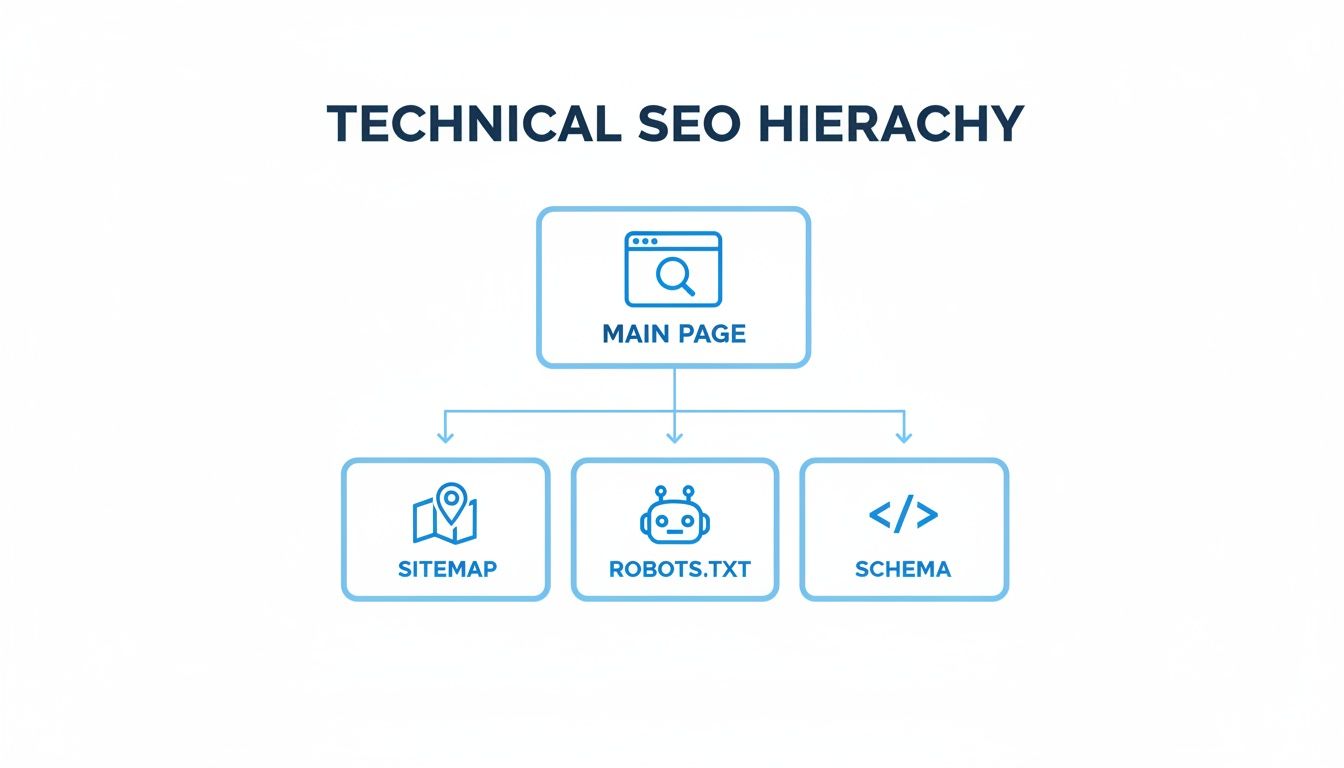
It’s a great visual for how these foundational elements all work together, guided by a clear structure that makes your site easy for search engines to crawl and understand.
Mastering Strategic Internal Linking
If great URLs set the stage, then internal linking is the script that directs the whole show. It’s the web of connections that guides users and search engine crawlers through your site, spreading authority and showing how your content is related. This isn’t just about dropping links randomly; it’s about creating a deliberate map of relevance.
The pillar-cluster model is one of the most powerful ways to do this. You start with a comprehensive “pillar” page on a broad topic. Then, you create more specific “cluster” pages that dive deeper into subtopics, linking them all back to the main pillar. This creates a tightly organized content hub that signals serious expertise to Google.
This methodical approach is what turns a random collection of pages into an authoritative resource. It tells search engines which pages are most important and how everything fits together.
A messy site structure is a huge reason pages never get indexed. Did you know that over 66% of pages have zero backlinks? Even pages that do have links can get ignored if crawlers can’t find them easily. A smart internal linking strategy helps fix this. It passes link equity from your strongest pages—like your homepage or a popular blog post—to newer or deeper pages, giving them the boost they need to get seen.
Ultimately, a thoughtful internal linking strategy is one of the best ways to increase organic search traffic over the long haul. By building these logical pathways, you keep visitors engaged longer and help search engines see the true depth of your expertise.
How to Audit and Improve Your Existing Site Architecture
Fixing your site architecture doesn’t mean you have to tear the whole thing down and start from scratch. More often than not, the biggest SEO wins come from a targeted audit that pinpoints exactly where things are going wrong. When you systematically find and fix these weak spots, you’ll see real, measurable improvements.
First things first, you need a clear map of your current structure. This isn’t about guesswork; it’s about getting the data. Tools like Screaming Frog or Ahrefs’ Site Audit are non-negotiable here. Think of them as an x-ray for your website, crawling it just like Google to reveal the underlying framework and flag critical problems.
Starting Your Technical SEO Audit
When you kick off your audit, you’re on the hunt for specific red flags—the kind that signal a confusing or inefficient architecture. These issues can burn through your crawl budget, send users packing, and water down your ranking potential.
Your first crawl will spit out a mountain of data. The trick is knowing what to look at first. Don’t get lost in the weeds; zero in on the metrics that have the biggest impact on how search engines and real people find their way around your site.
Here’s what you need to investigate right away:
- Crawl Depth: How many clicks does it take to get from your homepage to any other page? Your most important pages should never be more than three to four clicks deep. If they are, that valuable content is effectively buried.
- Orphaned Pages: These are pages with zero internal links pointing to them. If you can’t find them by clicking around your site, neither can search engines. They’re basically invisible.
- Broken Links (404 Errors): These create dead ends for both users and crawlers, which is terrible for user experience and wastes precious link equity. Fixing them is a quick, high-impact win.
- Redirect Chains: When one URL redirects to another, which then redirects to a third, it slows your site down and can confuse crawlers. You always want a single, direct 301 redirect for any content that has moved.
For a full rundown of what to look for, you can learn more by checking out our detailed guide on how to do a site audit.
Prioritizing Your Fixes for Maximum Impact
Once you’ve identified the problems, it’s time to build a battle plan. You absolutely must prioritize fixes based on their impact and the effort required. Start with the “quick wins”—the low-hanging fruit that gives you the most bang for your buck—before you tackle bigger, more complex structural changes.
It’s like fixing up a house. You’d patch a leaky roof before you start remodeling the kitchen. The same logic applies to your website’s architecture.
A successful site architecture audit isn’t about finding every single flaw. It’s about identifying and fixing the issues that most disrupt the flow of authority and prevent users and crawlers from finding your best content.
Your Actionable Improvement Checklist
Use this checklist to guide your efforts. This approach makes sure you handle the most critical issues first, paving the way for bigger, more strategic adjustments down the road.
- Fix All Broken Links and Redirects: This is your top priority. Use your crawl data to hunt down every 404 error and unnecessary redirect. Go in and update the internal links to point directly to the correct, final URL.
- Find and Link to Orphaned Pages: Round up all your orphaned pages. For each one, decide if it’s still valuable. If it is, weave it back into your site structure by adding relevant internal links from category pages or related blog posts. If it’s old or useless, delete it and set up a 301 redirect to a relevant page.
- Reduce Click Depth for Key Pages: Find important service pages or top-performing articles buried more than three clicks deep. Bring them closer to the surface by linking to them from your main navigation, footer, or high-authority pages like your homepage or pillar content.
- Analyze and Strengthen Internal Linking: Take a hard look at your internal linking patterns. Are you linking to your most important “money” pages from relevant blog posts? Make sure you’re using descriptive anchor text that tells both users and search engines what the linked page is about. This is how you strengthen your content silos and spread link equity where it needs to go.
By following this methodical process, you can turn a confusing site structure into a clean, logical framework. This not only improves your site architecture SEO but also creates a much better experience for every visitor, turning clicks into customers.
Common Questions About Site Architecture SEO
Even with the best-laid plans, building out your website’s blueprint always brings up a few questions. The world of site architecture SEO has a lot of moving parts, and seeing how they all connect is the secret to getting it right. This section is here to clear up some of the most common questions we hear, giving you direct, no-fluff answers.
Think of this as your quick-reference guide for those tricky “what if” moments. We’ll break down the common sticking points so you can move forward confidently and build a site that both your visitors and Google will love.
What Is the Ideal Click Depth for SEO?
As a rule of thumb, you want to keep your most important pages no more than three to four clicks away from your homepage. This is what we call a “shallow” architecture, and it’s a win-win. For users, it means they can find what they need without getting lost. For SEO, it helps search engine crawlers find and index your content efficiently without burning through their crawl budget.
When key pages get buried five or more clicks deep, they don’t get as much authority passed down from the homepage. That makes it incredibly difficult for them to rank for anything competitive. You can use a tool like Screaming Frog to map out your site’s click depth and quickly see which important pages are too far out of reach.
How Does Site Architecture Affect Crawl Budget?
Crawl budget is simply the number of pages Googlebot is willing to crawl on your site in a certain timeframe. A messy, disorganized site architecture is one of the fastest ways to waste it. If you have redirect chains, tons of low-value pages, or widespread duplicate content, you’re essentially sending crawlers on a wild goose chase, leaving your most important product or service pages undiscovered.
A clean, logical structure does the exact opposite.
By blocking unimportant sections with a well-configured robots.txt file and using canonical tags to handle duplicate content, you create a clear path for Googlebot. You’re essentially guiding it directly to your money pages, making sure every bit of that crawl budget is spent wisely.
A well-planned structure is essential for maximizing your site’s visibility. It’s a core piece of the puzzle that is search engine optimization. To see how everything fits together, it helps to understand what search engine optimization is on a broader level.
Flat Versus Deep Site Architecture: What Is the Difference?
Getting the difference between a flat and a deep site architecture is key to planning your layout. It really all comes down to how many clicks it takes to get to the pages furthest from your homepage.
- A flat architecture keeps the click depth very low. In this setup, almost every page is just a few clicks away from the homepage. This is the best approach for the vast majority of websites because it spreads link authority around more effectively and makes everything easy for users and crawlers to find.
- A deep architecture has many layers of categories, creating a much taller hierarchy. This might be necessary for a massive e-commerce giant with thousands of product subcategories, but for most, it just makes it harder for search engines to discover and index the pages buried at the bottom.
For nearly every business, the goal is simple: keep your architecture as flat as you logically can. This gives all your important pages, not just the top-level ones, the best shot at ranking.
Can I Change My Site Architecture Without Losing Rankings?
Yes, you absolutely can—but you have to be incredibly careful. A sloppy architectural change, especially one that changes your URLs, can completely wipe out your organic traffic overnight. There’s very little room for error here.
The key to doing it safely is a rock-solid 301 redirect plan. This means mapping every single old URL to its new location. A 301 redirect tells search engines that a page has moved for good, ensuring that nearly all of its ranking power and link authority get passed along to the new page.
Before you push anything live, do a full crawl of your site to get an inventory of every URL. As soon as the changes are live, submit your new XML sitemap in Google Search Console and keep a close eye on it for any 404s or crawl errors. When done right, an architectural update can lead to huge SEO gains.
At Netco Design LLC, we specialize in building websites with a powerful SEO foundation from the ground up. If you’re ready to turn your website into a reliable engine for growth, let’s talk about building a strategy that delivers results.

